
Kasse, Aufträge und Betrieb. In einem ruhigen System.
LeoPOS verbindet Annahme, Kasse, Auftragsfortschritt und Tagesabschluss für Textilreinigungen, Wäschereien und Änderungsschneidereien.
Beispieldaten · keine echten Kundendaten
Ein Produkt von LeoClean Premium Textilpflege
Offline weiterarbeiten
Der Betrieb bleibt auch bei kurzen Ausfällen handlungsfähig.
Offline-Verhalten ansehenSumUp in LeoPOS
Einmal verbinden. Sicher kassieren.
Verbinden Sie Ihr SumUp-Geschäftskonto einmal mit Ihrer LeoPOS-Lizenz. LeoPOS startet die Zahlung und schließt den Beleg erst nach Prüfung des Zahlungsstatus über die SumUp-API ab.
- Ein SumUp-Geschäftskonto pro LeoPOS-Lizenz
- Gemeinsame Nutzung in den Arbeitsbereichen dieser Lizenz
- Erneute Statusprüfung, falls die Rückkehr zur App unterbrochen wird
Der Inhaber verbindet das eigene SumUp-Geschäftskonto mit der Lizenz.
LeoPOS übergibt den Betrag an die installierte SumUp-App.
Der Beleg wird erst nach der API-Prüfung als bezahlt abgeschlossen.
Für die LeoPOS Android-App. SumUp-App, aktives Händlerkonto, Internetverbindung und eine von SumUp unterstützte Zahlungsannahme sind erforderlich. API-Rückerstattungen sind derzeit nicht enthalten.
Ein Arbeitsfluss statt Insellösungen
Alles, was zwischen Annahme und Abholung passiert.
LeoPOS ordnet den Betrieb nach echten Arbeitsschritten. Teams sehen, was jetzt wichtig ist – ohne zwischen getrennten Systemen zu springen.
Annahme & Kasse
Schnell erfassen, sauber abrechnen
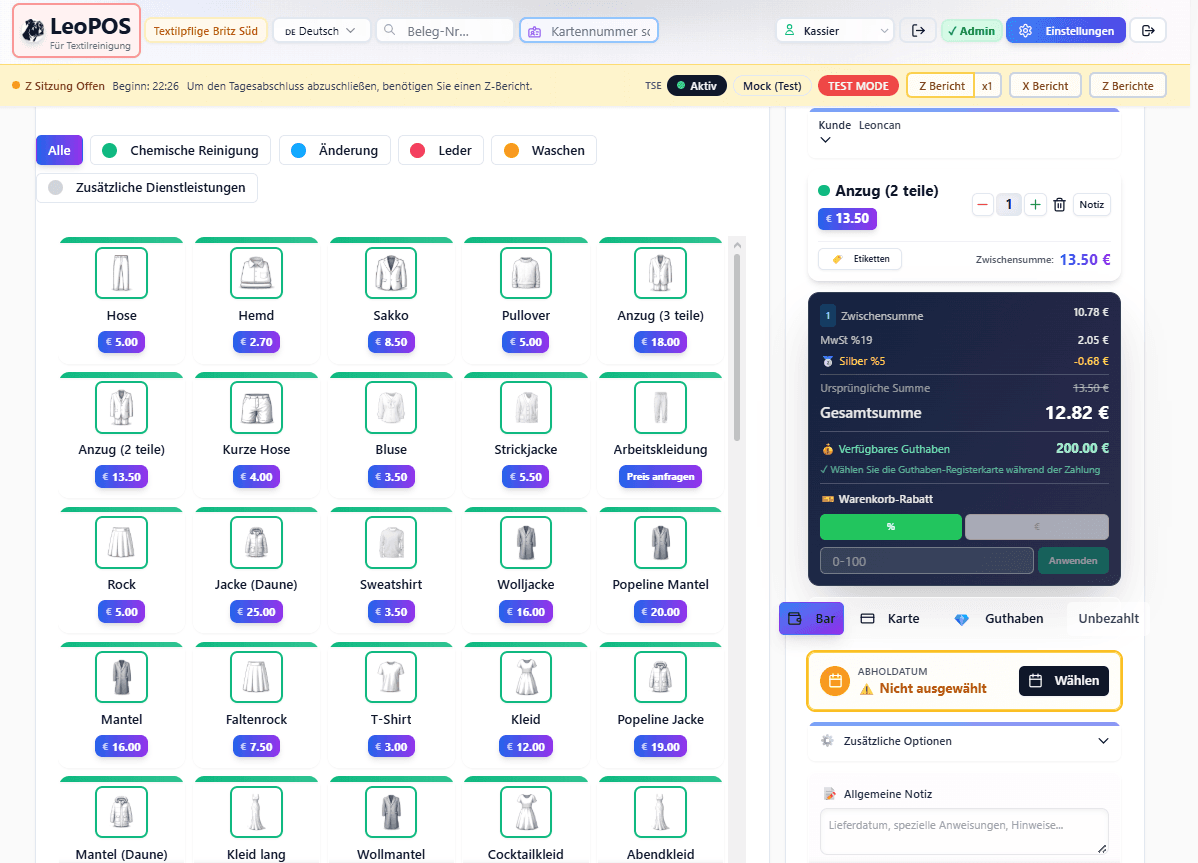
Artikel, Leistungen, Rabatte, Guthaben und Zahlungsarten bleiben in einem nachvollziehbaren Belegfluss.- Flexible Artikelkataloge
- Kunden- und Belegsuche
- Bar, Karte und Guthaben
Aufträge & Produktion
Jeder Auftrag am richtigen Punkt
Status, Notizen, Etiketten und Abholtermine machen den nächsten Arbeitsschritt für das Team sichtbar.- Produktionsstatus
- Etiketten & Scanner
- Abholung und Ausgabe
Filialen & Personal
Verantwortung bleibt transparent
Arbeitsbereiche, Rollen und Schichten lassen sich passend zum Betrieb organisieren.- Mehrere Arbeitsbereiche
- Rollen & Berechtigungen
- Schichtübersicht
TSE & Berichte
Der Tag endet nachvollziehbar
Tagesabschluss, Kassenbericht und prüfbare Vorgänge werden Teil des normalen Ablaufs.- Z- und X-Berichte
- Kassenbericht
- Nachvollziehbare Vorgänge
Sicher einarbeiten
Training ohne echte Kassenwirkung
Neue Mitarbeitende üben typische Abläufe in einer klar gekennzeichneten Testumgebung.Trainingsmodus ansehen→Sauber abschließen
Kassenbericht als geführter Tagesabschluss
Barbestand, Differenzen und Abschluss bleiben getrennt und nachvollziehbar.Kassenbericht kennenlernen→Mehr als eine Kasse
LeoPOS verbindet Betrieb und digitale Services.
LeoBridge und LeoAI erweitern den Arbeitsablauf dort, wo Informationen zwischen Filiale, Kundenservice und Online-Angeboten fließen.01 / BRIDGE
LeoBridge
Verbindet ausgewählte Betriebsdaten mit Online-Services und schafft einen kontrollierten Übergang zwischen Kasse und digitalem Kundenkontakt.02 / ASSIST
LeoAI
Unterstützt bei wiederkehrenden Servicefragen und führt Kundinnen und Kunden zum passenden digitalen Weg.Kurz und konkret
Häufige Fragen vor dem ersten Test.
Die wichtigsten Grenzen und Voraussetzungen auf einen Blick – ohne versteckte Annahmen.
Was sehe ich in der LeoPOS-Demo?
Die Demo zeigt einen realistischen Beispielbetrieb mit Beispieldaten. Es werden keine echten Kundendaten verwendet.
Was brauche ich für integrierte SumUp-Zahlungen?
Erforderlich sind die LeoPOS Android-App, die installierte SumUp-App, ein aktives SumUp-Händlerkonto, Internet und eine von SumUp unterstützte Zahlungsannahme.
Wie wird SumUp einer LeoPOS-Lizenz zugeordnet?
Der Lizenzinhaber verbindet einmal das eigene SumUp-Geschäftskonto. Dieses Konto gilt anschließend für die Arbeitsbereiche derselben LeoPOS-Lizenz.
Sind SumUp-API-Rückerstattungen enthalten?
Nein. Rückerstattungen werden derzeit in der SumUp-App ausgeführt und anschließend als Storno in LeoPOS dokumentiert.
Was passiert bei einer kurzen Internetunterbrechung?
Ausgewählte LeoPOS-Abläufe bleiben während kurzer Unterbrechungen nutzbar. Integrierte SumUp-Zahlungen und ihre API-Prüfung benötigen jedoch Internet.
Was bedeutet „TSE-bereit“ bei LeoPOS?
LeoPOS bildet TSE- und Tagesabschlussabläufe im Kassensystem ab. Welche Einrichtung für Ihren konkreten Betrieb erforderlich ist, klären wir bei der Einführung.
Warum heißt es „aus der Praxis“?
LeoPOS wurde aus den täglichen Abläufen einer Textilpflege heraus entwickelt und an Annahme, Bearbeitung, Ausgabe und Tagesabschluss ausgerichtet.
Aus der Textilpflege für die Textilpflege